 Blog
Blog Links
Links Contact
 About
AboutBack on Debian
Publish Date: 2026-04-30
Reasons to use Debian.
So here I am back on Debian, and this time with the KDE Plasma desktop. Not only do I run Debian for my servers, but also for my personal computer too!
Unlike before on the other distributions I was trying out, I'm not using as many flatpak applications this time since it's a gosh darn storage hog, and because I ran into issues with Firefox as a Flatpak since the containerization format doesn't support mDNS; it made for a perplexing case seeing that I could connect to my NAS servers web interface from Pale Moon, but not Firefox... I also didn't like how Thunderbird's profile sources are linked to a fake /run/ path that doesn't actually exist on the host; it's lead to a number of issues for me in how I sync my POP mailboxes.
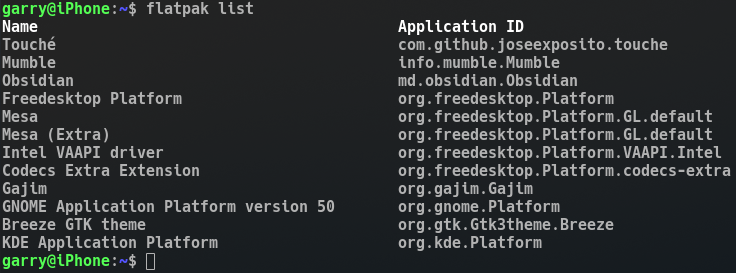
Just keep it minimal.
I'm also using Deja dup for user data backups since it's an all around better backup solution with support for network shares as a backup destination. I still don't like the built-in backup service that comes with KDE Plasma due to its limitations with network file share support. When I was on KDE Neon, SMB4K was not very reliable in maintaining a connection with the network share, often crashing when changing networks between home and work. The Dolphin kiofuse service works well enough for basic file management needs and is stable.
Since Debian's default boot splash was a text only setup, I went ahead and installed the Debian 13 Plymouth graphical boot splash theme to cut down on the distracting startup console messages littering the screen. I'd prefer it to display nothing at all on boot up, but I do have to type in a password for the disk encryption and appreciate having something that doesn't momentarily make me think my computer broke. This was broken on KDE Neon for me and I was having to type in my LUKS password on some janky console that if mistyped, it would have me reboot the system to start over. Being one of the rare few people that consistently shuts their computer down, bootup wasn't an enjoyable process on KDE Neon.
A few other minor adjustments I've made to my system was installing the KDE4-Seasons-Colors color theme and the Oxygen Qt widget and Kwin themes. The default Breeze theme is a little too flat and barren of visual indicators in the UI.
I use the Xorg session and was able to setup my touchpad gestures and Xorg input device configurations for my trackball and G600 Logitech mouse. None of this stuff worked on the Wayland session by the way...
I did discover that the ksshaskpass service seems to have a Wayland only feature though where if a Konsole is launched with an SSH command (or in my case, RSync to a remote destination) from a custom file action in Dolphin, it'll automatically hook up with the KDE Wallet and doesn't prompt me for my SSH key passwords. Meanwhile this feature doesn't work on Xorg, however ksshaskpass does work perfectly fine if I manually open a Konsole and attempt to SSH or use any SSH function. I wished it worked in X, but oh well.
Why Debian instead of something else?
Debian with the XFCE desktop is originally what I ran on for the longest time, probably 15 years. I consider it one of the conservative distributions since it doesn't attempt to do anything whacky and crazy that would inevitably break making me have to work around or against it. Around 2022 I jumped off of Debian 8 to Pop_OS for a little while since I was interested in some of the things I heard coming from System76, but because I was in the middle of moving out of my apartment shortly followed with buying a house, I didn't have time to tinker with my computer and stuck with it until here recently. Now that things have settled down, I've had some time on my hands to explore other distributions and software which I've been writing about on this blog. For example, Joplin and Obsidian, Nextcloud, snaps and flatpak, Wayland compositors, various web browsers and desktop environments.
Of late, I struggle to find a use case for a lot of this stuff though and resort back to what I know and what works. I'll write a little more on this in a later blog though.
Thanks for reading my blog!
[Back to top]
Comments: